For small business owners, and the leaders who want their team's week back
Find the hours busywork is taking. Take one back.
Small business time management without a timer. Type rough weekly hours for the admin, inventory, customer and marketing work that fills your week. Get a ranked map of where time could come back and one change to make first, today, not after a month of tracking.
Free to start. See how many hours could come back and your biggest opportunity for free. The full map, saved plans with check-ins and multiple teams need a subscription.
Nothing is saved until you say so. Start, change your mind, close the tab. Delete a saved plan any time.
Built by a measurement researcher. Brooke Houck, PhD, educational measurement and assessment, founder of Phronesis Labs.
Your own ranked map of recoverable hours, not a time report.
Every area of the business gets a recoverable-hours estimate. The one with the clearest return is marked as your first move, with a two-week review date.
Before: the same 20-odd hours of admin, requests and reporting every week, nobody sure where they go. After: one ranked list and one change with a date on it.
Numbers are directional. The tool ranks opportunities. It will not tell you to the minute, and it does not try to.
First moveBatch invoices, bills and paperwork into one weekly admin block. About 4.5 hours back. Review in two weeks.
03 · For team leaders and department managers
You do not fill it in for your team. They do.
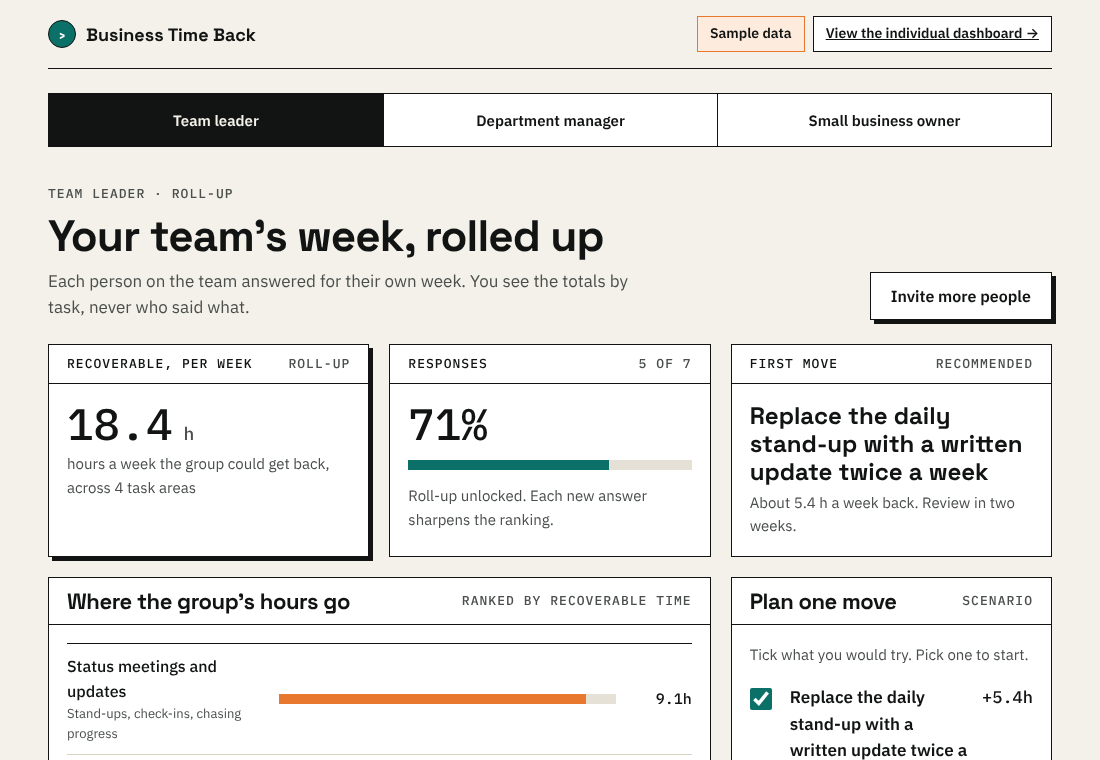
Create a group and get a link. Each person opens their own week, answers for themselves in four minutes, and keeps their own result. You see the team total by task once three people have answered. Never who said what.
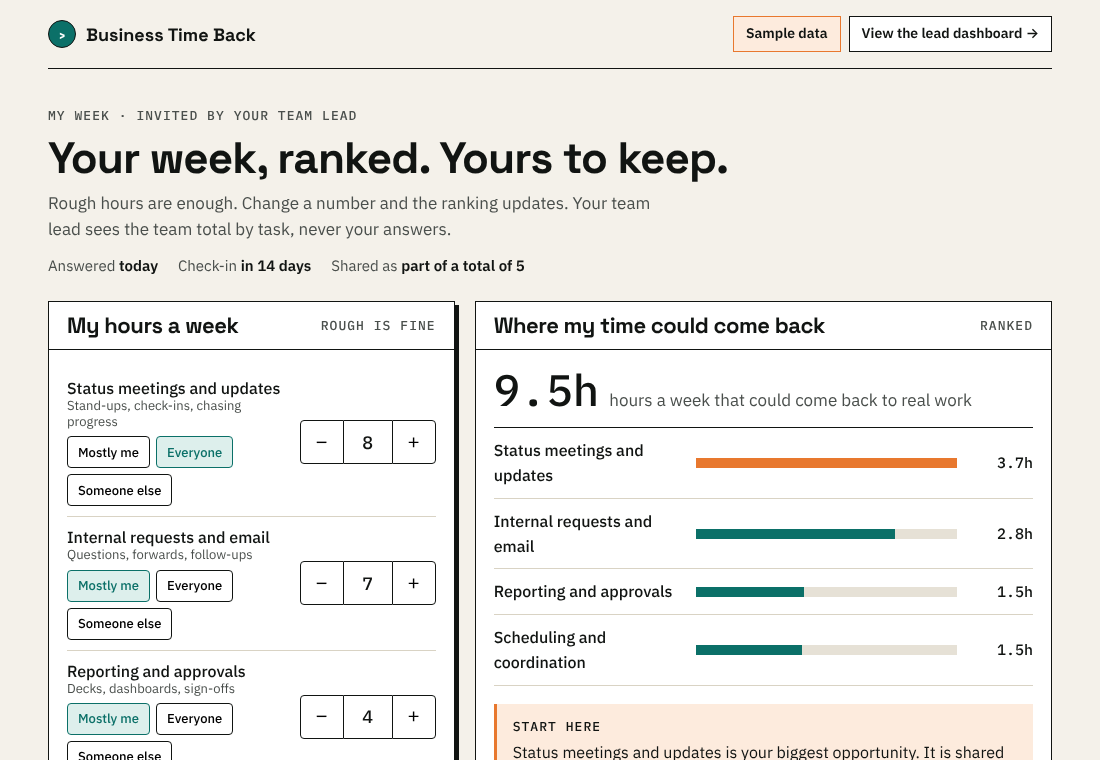
Each person's answers are their own. That is what makes the numbers honest.
What you seeLeader
The roll-up
Recoverable hours for the group, ranked by task
How many have answered, and the first move to try
Teams as totals for a department manager; you and staff for an owner
No individual's answers, ever. Nothing under three responses.
How Business Time Back works: three screens, about four minutes.
01
Estimate
Type your own rough weekly hours for the recurring work. A leader creates a group and sends a link instead; each team member answers for their own week, in four minutes, without an account.
02
Rank
The tool compares the hours with a task library and the workforce model behind Phronesis Labs tools, then ranks each area by recoverable time. A team lead sees the team total by task, never who said what.
03
Choose one move
Pick a first change from a short list, see the hours it could redirect, set a two-week check-in. Save it with your email if you want it back.
05 · Compared
Business Time Back vs time tracking software and employee monitoring.
Compared on
Business Time Back
Time tracking
Activity monitoring
Question answered
What should I change first?
How many hours went where?
What is each person doing now?
Data source
Your rough estimates by task
Timers or manual logs
Screens, apps, keystrokes
Looks
Forward, at the next change
Back, at what happened
Live, at people
Account
None to start
Yes
Yes, for everyone
Good for
Getting hours back
Billing and timesheets
Nothing Phronesis Labs would build
Need billable hours? Keep Toggl or Harvest. Many owners use both.
06 · Who it is for
Who it is for: owners, team leads and department managers.
Shop or retail
Stock counts and reordering vs. time on the floor.
Local service
Scheduling and invoicing vs. the job that pays.
Online store
Order-status messages and listing upkeep vs. growing the catalog.
Café or restaurant
Supplier orders and rotas vs. the food and the room.
Team lead
Status meetings and chasing updates vs. the work the team was hired to do. Each person answers for themselves.
Department manager
Approvals, reports and scheduling vs. the decisions only you can make.
Not for: monitoring employees, building a surveillance system, or getting a guaranteed savings figure from a quick estimate.
07 · Your data
What we keep, and why.
Business Time Back is made by Phronesis Labs, LLC, founded by Brooke Houck, PhD. It runs on the same workforce model behind Cairn Careers and AI Job Risk Check.
Your answers are de-identified before they are used for anything beyond your own map: no name, no email, no group, no business attached. In that form they help the model learn how working weeks are actually spent. Nothing is sold and nothing leaves Phronesis Labs. The privacy policy below says exactly what is kept.
We store
Each person's own answers: owner, lead or team member, business or team type and size, role, hours per task, the move chosen, and the two-week answer. Stored without names.
What a lead sees
The team roll-up by task. Never an individual's answers, and nothing at all until at least three people have answered.
We never store
Your name, staff names, customer data, or anything typed about a person. Email only if you subscribe to save plans, and only to send them back.
Who uses it
Phronesis Labs. Never sold. Never shared outside Phronesis Labs.
Your rights
Delete a saved plan and its estimates at any time from the link in your email. Anonymous sessions cannot be looked up later, so there is nothing to find.
Business Time Back is a web tool that shows small business owners and team leaders where their working week goes and which tasks to cut back first. You type rough weekly hours for the recurring work. For free, it shows how many hours could come back and your biggest opportunity. A subscription shows every task ranked, the moves to make and two-week check-ins. It is made by Phronesis Labs.
Does Business Time Back monitor employees?+−
No. Business Time Back does not track activity, screens, apps or keystrokes. Each person types their own rough estimates for their own week. A team lead sees only the team total by task, never one person's answers.
How much does Business Time Back cost?+−
Business Time Back is free to try. Mapping your week shows how many hours could come back and your biggest opportunity, and a team lead sees the team's total and its top task area. A subscription unlocks every task ranked with hours, all the suggested moves, saved plans with two-week check-ins, the full team roll-up and more than one team at once.
Do I need an account to use Business Time Back?+−
No. You can map your week and see your results without an account. An email is asked for only if you subscribe to save plans, and it is used only to send your saved plans and their check-in reminders.
How accurate are the results?+−
Business Time Back is directional. Rough hours go in and a ranking comes out. It tells you where to look first, not exactly how many hours you will get back. Rough estimates are enough because the goal is the order of tasks, not a precise count.
Every week without a map, the same hours go to the same busywork.
Four minutes shows where your time could come back and one change to make first.
 Business Time Back